
Download AB Repeat Player APK – Multimedia App for Language Learners
Overview
AB Repeat Player is a specialized multimedia application designed to meet the needs of language learners, music students, and practitioners of disciplines such as dance and tai-chi. Developed by LearnersTechLab, the app offers a focused solution for repeatedly playing specific segments of audio or video content. Its core functionality centers around the AB repeat feature, which allows users to define two markers—point A and point B—and automatically loop playback between them.
This capability is particularly valuable for mastering pronunciation, practicing listening comprehension, or refining choreography. The app is tailored for Android users seeking a reliable, no-frills tool for targeted repetition without the complexity of full-featured media players. While the developer did not provide additional background on their broader product portfolio, the app’s design suggests a strong emphasis on educational utility and user efficiency.
Real-world use cases include studying foreign language dialogues, rehearsing musical phrases, or analyzing movement sequences in martial arts training. The app integrates both audio and video playback under a single interface, accessible via two distinct icons within the same application package.
Key Features & Capabilities
- AB Repeat Functionality: Users can set two custom markers (A and B) to loop playback between them, ideal for focused repetition during learning or practice sessions.
- Bookmark System: Unlimited bookmarks allow users to save multiple reference points within a media file for quick navigation and review.
- Customizable Jump Buttons: Three user-defined jump buttons enable rapid navigation to preset locations, improving workflow efficiency during study or rehearsal.
- Multi-Media Support: The app supports both audio and video files, making it versatile across different learning and training scenarios.
- Sleep Timer: A built-in timer allows the player to automatically stop playback after a user-defined duration, useful for nighttime listening or relaxation.
- Call and Headset Integration: Automatic pause on incoming calls and headset disconnection ensures uninterrupted playback and enhances user experience during mobile use.
- Bluetooth Controls: Supports remote control via Bluetooth devices, enabling hands-free operation during physical activities or extended study sessions.
- SD Card Installation: The app can be installed directly onto an SD card, helping manage device storage on lower-capacity Android devices.
- Audio Speed & Equalizer Enhancements: Version 4.x.x introduced a message box in the audio speed and equalizer settings, improving user feedback and interface clarity.
These features collectively create a streamlined experience for users who require precision in media playback. For example, a language learner can set A and B to a short sentence, repeat it until mastery, and use bookmarks to return to key phrases. Similarly, a dancer can isolate a 30-second sequence for repeated analysis. The app’s focus on simplicity and functionality makes it a practical tool for targeted, repetitive learning.
User Interface, Workflow & Performance
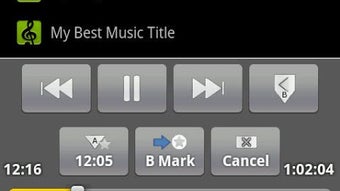
The user interface of AB Repeat Player is designed with clarity and ease of access in mind. The app presents a clean layout with clearly labeled controls, including dedicated buttons for setting A and B points, playback, pause, and jump functions. Navigation between media files is straightforward, and the dual-purpose design—supporting both audio and video—allows users to switch between formats without leaving the app.
The workflow is intuitive: users define A and B markers, activate repeat mode, and begin playback with minimal steps. The app maintains consistent responsiveness during playback, though exact performance details were not specified. The developer did not provide information on CPU or RAM usage, so users should monitor resource consumption based on their device’s performance.
Stability appears to be well-maintained, with features like automatic pause on call and headset removal contributing to a seamless experience. The addition of a message box in the audio speed and equalizer settings suggests ongoing refinement of the user experience, indicating attention to interface feedback and usability.
Compatibility & System Requirements
AB Repeat Player is designed for Android devices and is available as an APK file for direct download and installation. The app supports various media formats, though the specific file types are not listed. Installation can be performed on internal storage or an SD card, providing flexibility for users managing limited device space.
The developer did not specify exact system requirements, including minimum Android version or hardware specifications. Compatibility information was partially provided, indicating the app is intended for mobile Android platforms. Users should ensure their device meets general Android app compatibility standards.
The app’s file size is not specified, but given its focused functionality and lack of ads or in-app purchases, it is likely optimized for efficient storage use. For users concerned about performance, testing on their specific device is recommended.
Pros and Cons
Pros
- Free to download and use with no ads or in-app purchases
- Powerful AB repeat function for precise media segment repetition
- Supports both audio and video playback in a single application
- Unlimited bookmarks for saving multiple reference points
- Customizable jump buttons improve navigation efficiency
- SD card installable, saving internal storage space
- Automatic pause on calls and headset disconnection
- Bluetooth remote control support for hands-free use
- Enhanced user interface with message feedback in version 4.x.x
Cons
- Exact system requirements were not listed
- Performance metrics such as CPU or RAM usage are not provided
- Limited information on supported media file formats
- No official update history or changelog details available
- Only available as an APK, which may require sideloading on some devices
FAQ Section
Is AB Repeat Player compatible with all Android devices?
The app is designed for Android, but exact compatibility details were not specified. Users should ensure their device meets general Android app requirements.
Is the app safe to download and install?
AB Repeat Player is free and does not contain ads or in-app purchases. However, as it is distributed as an APK, users should download it from trusted sources to ensure security.
Can I use AB Repeat Player offline?
Yes, the app functions fully offline once installed, making it ideal for learning or practice without internet access.
Does the app support audio speed adjustment and equalizer?
Yes, the app includes audio speed control and equalizer settings, with version 4.x.x adding a message box for improved user feedback.
How do I install AB Repeat Player on my device?
Download the APK file and install it directly on your Android device. This may require enabling “Install from unknown sources” in device settings.
Final Thoughts + CTA
AB Repeat Player stands out as a focused, efficient tool for learners and practitioners who rely on repetitive media playback. Its AB repeat functionality, combined with bookmarks, customizable navigation, and seamless integration with calls and Bluetooth, delivers a robust experience tailored to language acquisition, music training, and physical skill development. The absence of ads and in-app purchases enhances usability, while the ability to install on an SD card improves accessibility for users with limited storage.
Although system requirements and performance data are not detailed, the app’s clean interface and practical features suggest strong reliability. For anyone seeking a no-frills, free, and effective multimedia tool for targeted repetition, AB Repeat Player is a compelling choice. Download AB Repeat Player now.





.png)

